A proper home theater setup comes down to four things: the room, the equipment, the placement, and how everything is calibrated together.
If you’re trying to figure out how to set up home theater systems the right way, this guide walks through it step by step, from layout to audio tuning. Done right, you don’t just get louder sound or a bigger screen. You get a system that feels consistent every time you use it.
What You Need for a Home Theater Setup
Before you think about placement, you need to understand what makes up a complete system.
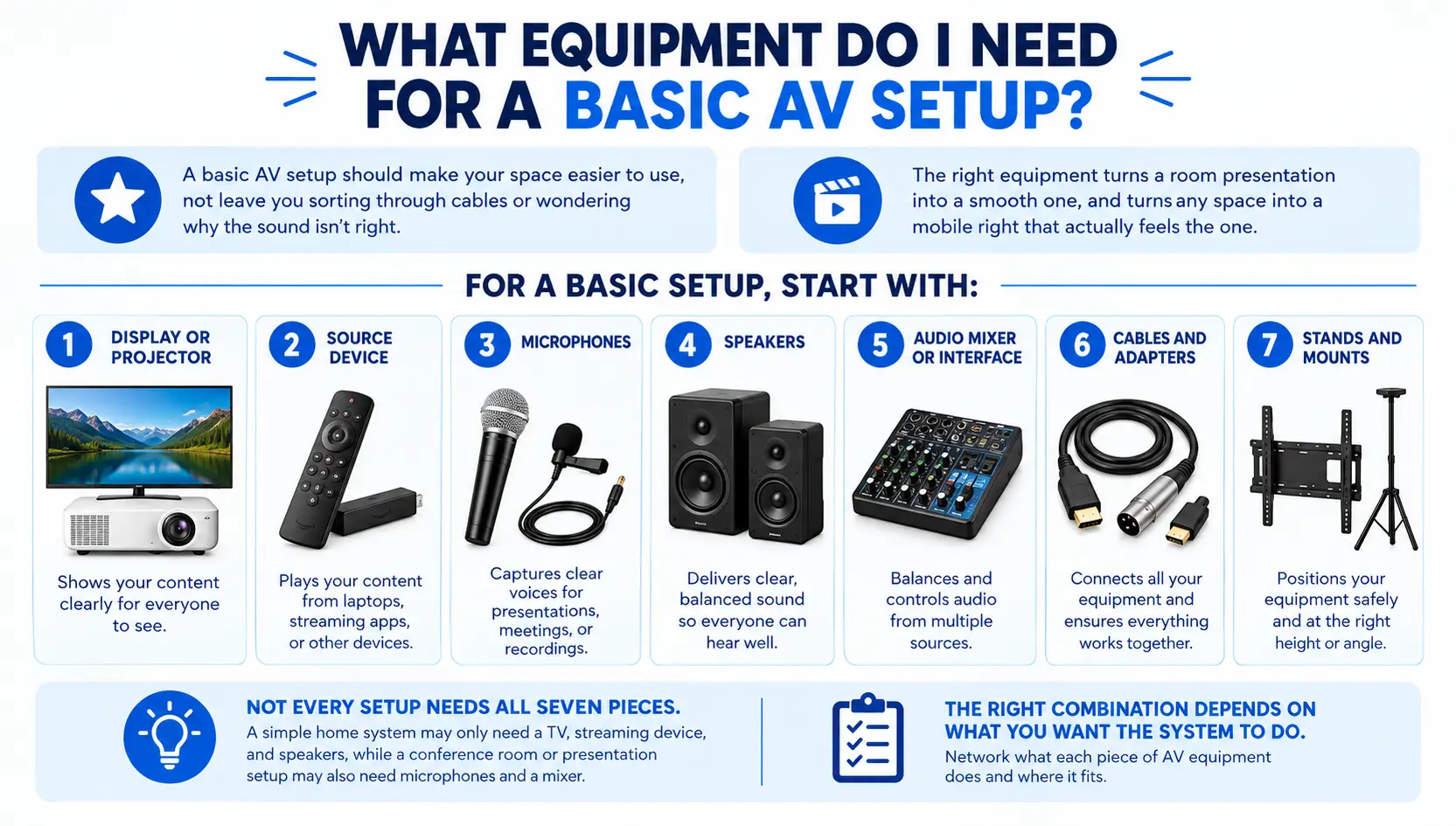
A basic home theater system setup includes:
- a display (TV or projector)
- an AV receiver to control audio and video
- speakers (5.1, 7.1, or Atmos depending on setup)
- a subwoofer for low frequencies
- a media source (streaming device, console, or Blu-ray)
- proper cabling and power protection
This is where many setups fall apart. People buy components individually without thinking about how they work together. A good system isn’t built piece by piece. It’s planned as a whole.
How To Choose the Right Room for Your Home Theater
Room choice affects performance more than the equipment.
Rectangular rooms work better than square ones because sound distributes more evenly. Ceiling height also matters. Too low and the room feels compressed. Too high and sound becomes harder to control.
Light is another factor. If sunlight hits your screen directly, it will wash out the image no matter how good the display is. Darker walls and controlled lighting improve contrast significantly.
Small rooms can still work, but they require tighter planning. Speaker placement, seating distance, and layout become less forgiving.
This is where a lot of DIY setups start with limitations they don’t realize until later.
Home Theater Setup: How to Set Up Home Theater Step by Step
This is where everything comes together.
Step 1 — Plan Your Room Layout
Start with the viewing position, not the screen.
A simple rule: Screen size ÷ 0.55 = ideal viewing distance (in inches)
From there:
- center seating directly in front of the display
- avoid placing seats against the back wall
- leave space for speaker positioning
If the layout is wrong, everything else compensates for it.
Step 2 — Mount Your Display or Set Up Your Projector
The screen should be at eye level when seated.
That usually places the center of the screen around 42–48 inches from the floor. Mounting it higher might look better visually, but it reduces comfort over time.
For projectors, throw distance matters. Too close and the image shrinks. Too far and brightness drops.
This is where home movie theater installation starts to separate clean setups from improvised ones.
Step 3 — Setting Up Home Theater System Audio
Audio placement is where most setups go wrong.
For a standard 5.1 system:
- front speakers sit at ear level, angled toward the listener
- center speaker aligns directly with the screen
- surround speakers sit slightly behind and to the sides
- subwoofer placement is tested, not guessed
For Atmos setups, ceiling or height speakers need proper alignment to create overhead effects.
This step defines how immersive the system feels. Not the speaker brand. Not the price.
Step 4 — Connect Your AV Receiver and Sources
Everything runs through the AV receiver.
TV connects via HDMI ARC or eARC. Sources connect directly to the receiver. From there, audio is distributed to speakers.
Label your cables.
It sounds basic, but it saves hours later when something needs to be adjusted or replaced.
Step 5 — Calibrate Your Audio and Video
This is where most guides stop too early.
Auto-calibration tools help, but they’re not perfect. They measure sound based on microphone position, not how you actually hear it across the room.
Basic adjustments still matter:
- balance speaker levels manually
- adjust subwoofer output
- fine-tune dialogue clarity
Without calibration, even a well-installed system feels inconsistent.
Acoustic Treatment for Your Home Theater
This is the part almost every home theater guide glosses over.
First Reflection Points
Sound reflects off walls before reaching you. Treating these points reduces echo and improves clarity.
Bass Traps
Placed in corners to control low-frequency buildup. Without them, bass feels uneven.
Rear Wall Diffusion
Instead of absorbing sound, diffusers scatter it. This keeps the room from feeling flat.
Over-treating a room can deaden it. Under-treating leaves reflections uncontrolled. The goal is balance, not silence.
Home Theater Lighting Setup
Lighting affects how you perceive the screen.
Bias lighting behind the display reduces eye strain and improves contrast. It should match a neutral color temperature around 6500K.
Ambient lighting should be dimmable. Direct light hitting the screen should be avoided entirely.
Lighting doesn’t get attention during setup, but it changes how the system feels during use.
DIY vs. Professional Home Theater Installation
DIY works for simple setups.
A TV and soundbar in a small room can be handled without much trouble.
Beyond that, things change quickly.
In-wall wiring, ceiling speakers, multi-room systems, and full surround setups require planning and execution. Mistakes don’t show up immediately. They show up in daily use.
Speakers slightly misaligned. Wiring that becomes difficult to manage. Systems that need constant adjustment.
A proper home theater install avoids these problems from the start.
Professional home movie theater installation focuses on placement, calibration, and integration. It’s not about adding equipment. It’s about making the system behave correctly.
Home Theater Setup for Small Rooms
Small rooms don’t limit quality, but they require smarter decisions.
- large TVs often work better than projectors
- compact speaker setups (2.1 or 3.1) are more practical
- wall-mounted speakers save space
- seating should avoid corners and walls
Acoustics become more sensitive in smaller spaces. Small placement changes make a bigger difference.
Most Common Home Theater Setup Mistakes You Should Avoid
Some issues come up repeatedly:
- speakers placed too high or in corners
- screen positioned where light hits it
- skipping cable management
- ignoring ventilation for AV equipment
- relying entirely on auto-calibration
None of these are major on their own. Together, they reduce the overall experience.
Frequently Asked Questions
How do I set up a home theater sound system with my TV?
Connect your TV to the AV receiver using HDMI ARC/eARC, then connect speakers to the receiver. The receiver manages audio output.
What’s the ideal screen size for a home theater?
Multiply your viewing distance (in inches) by 0.55 to estimate the ideal screen size.
Do I need a dedicated room for a home theater?
No. A dedicated room improves performance, but a well-planned living room setup can still deliver strong results.
What size room do I need for a home theater?
There’s no fixed size, but rectangular rooms with enough depth for seating and speaker placement work best.
Final Verdict
A home theater isn’t defined by the equipment you buy.
It’s defined by how everything is placed, connected, and tuned together.
That’s where the difference shows up.
Get Your Home Theater Set Up the Right Way
If you want a system that works without constant adjustments, installation matters.
R&N Technical provides professional home theater installation services, including layout planning, speaker placement, wiring, and full system calibration.
Get in touch today and build a setup that performs the way it should.